OPEN SOURCE VIDEO REFRAMING ENGINE

TURN HOURS OF MANUAL VIDEO CROPPING INTO INSTANT VERTICAL SHORTS

Automatically transform 16:9 widescreen YouTube podcasts, webinars, and vlogs into high-converting 9:16 portrait clips for TikTok, Instagram Reels, and Shorts. Powered by local AI face tracking & smart scene cutting.

100% Free & Open Source
Runs 100% Locally (Private)
No Monthly Subscriptions
Zero Video Watermarks
16:9 Widescreen Source 16:9 Source 9:16 Vertical Shorts 9:16 Shorts
AI SMART FOCUS ACTIVE
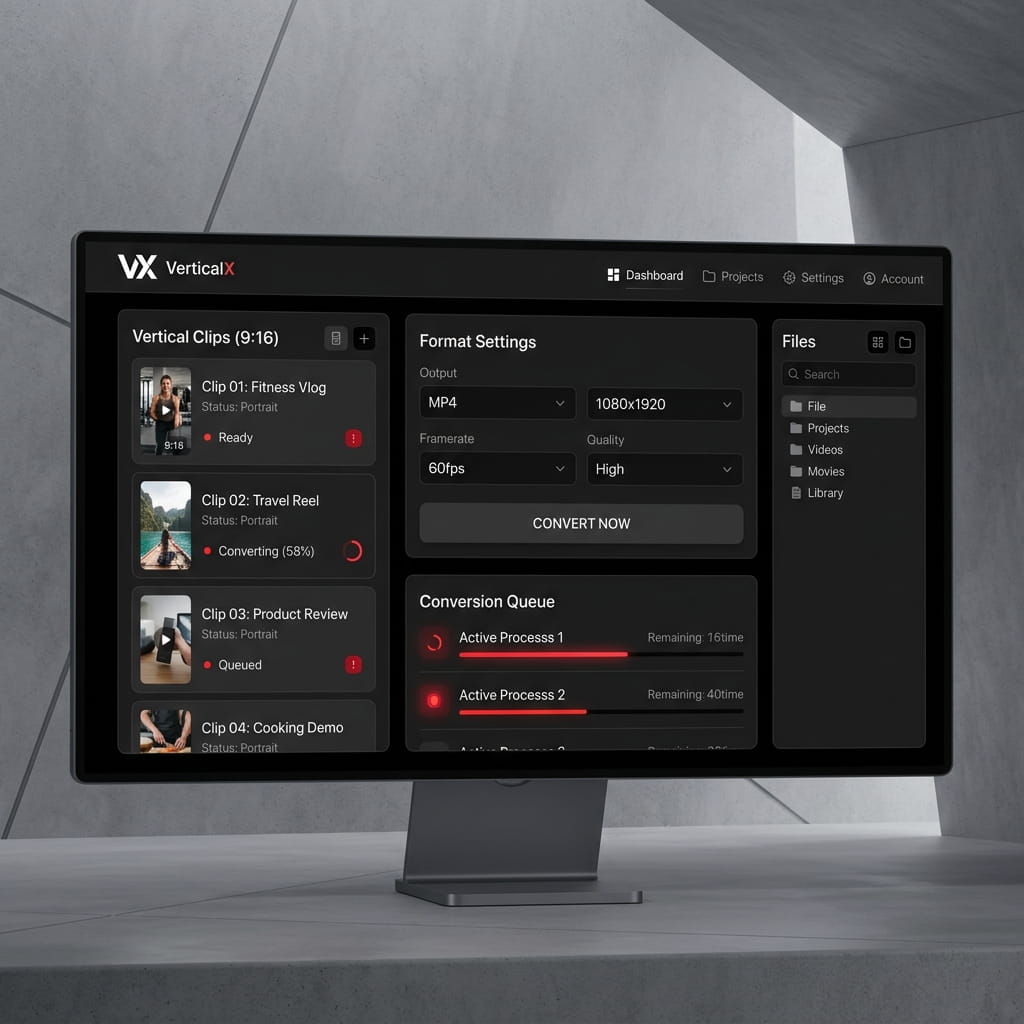
VerticalX Interface Mockup
HARDWARE ACCELERATION Apple VideoToolbox / NVENC
🎯
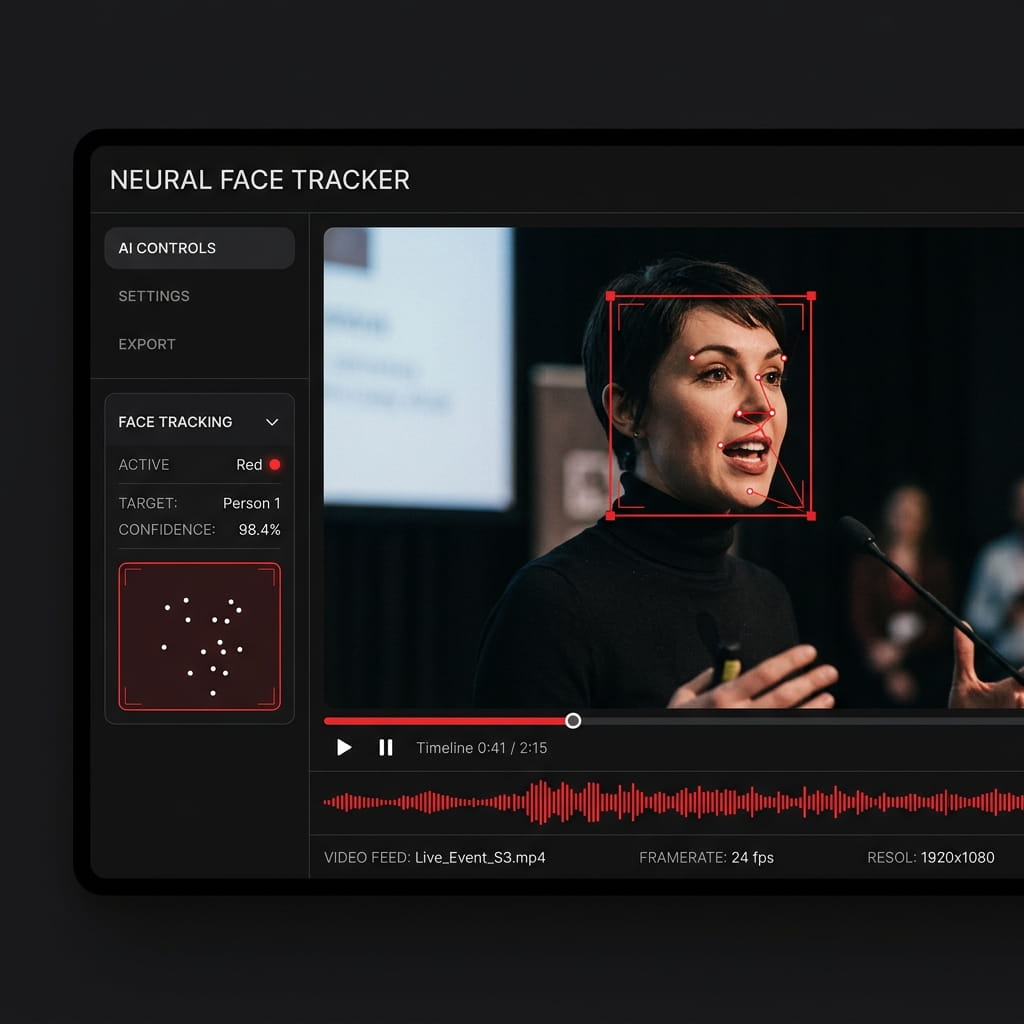
AI SPEAKER TRACKING Sub-Pixel Focus Frame
// TARGET PLATFORMS & FORMATS

TIKTOK 9:16 Shorts
REELS Instagram Shorts
YOUTUBE Shorts Clips
SNAPCHAT Spotlight

WHY MANUAL VIDEO CROPPING IS HOLDING YOU BACK

Creating vertical content manually consumes 80%+ of an editor's time. VerticalX eliminates repetitive keyframing.

THE OLD WAY

Tedious Manual Keyframing

Tracking speaker faces frame-by-frame in Premiere Pro or CapCut takes 2 to 3 hours per 10-minute video clip.

THE VERTICALX WAY

AI Speaker & Face Tracking

Computer vision automatically tracks speaker movements and fast action, generating 9:16 cuts in seconds.

THE OLD WAY

$30 to $90/Month Subscriptions

Proprietary cloud SaaS platforms limit export minutes, lock key features behind paywalls, and slap watermarks on exports.

THE VERTICALX WAY

100% Open Source & Free

Zero monthly subscription fees, zero watermark locks, and unlimited video processing forever on your local hardware.

THE OLD WAY

Sending Footage to Cloud Servers

Uploading gigabytes of unreleased podcasts or raw footage to third-party cloud servers risks privacy leaks and bandwidth delays.

THE VERTICALX WAY

100% Offline & Private Processing

Your video files never leave your machine. Process videos locally at maximum hardware speeds on Mac or PC.

FROM WIDESCREEN TO VERTICAL IN 3 STEPS

No editing expertise required. Upload your video and let VerticalX handle the reframing pipeline.

[01]
📤

Upload Source Video

Drag and drop any widescreen 16:9 MP4 or MOV file into the VerticalX web editor interface.

[02]
🎯

AI Detects Shots & Tracking

PySceneDetect identifies shot boundaries while computer vision centers active speaker faces dynamically.

[03]

Export Vertical Cuts

Batch render 9:16 vertical shorts complete with thumbnails and automatic Whisper subtitle captions.

ENGINEERED FOR MAXIMUM CONTENT PERFORMANCE

Comprehensive video reframing architecture for creators, podcast hosts, and developers.

🎯

Smart Face & Motion Tracking

Tracks human faces, animals, or fast action across video frames, keeping subjects centered automatically.

📐

6 Cinematic Layout Modes

Select optimal framing for any shot: Smart Focus, Center Crop, Blurred Background, Black Fit, Zoom-Fit, and Dual Stack Split Screen.

💬

Auto-Subtitles via Whisper AI

Integrated OpenAI Whisper engine automatically transcribes spoken audio into frame-accurate WebVTT vertical subtitles.

10x Hardware Acceleration

Probes Apple Silicon GPU (`h264_videotoolbox`) and NVIDIA GPUs (`h264_nvenc`) for blazing fast batch rendering.

🖥️

Dual Web Studio & CLI

Visual browser editor for timeline tuning + a headless Python CLI engine for batch automation.

🔍

Subject Spread Advisor

Detects when speakers sit far apart and warns you to select Dual Stack split-screen layout.

SUB-PIXEL PRECISION SPEAKER FRAMING

Never miss a speaker transition. VerticalX calculates frame-by-frame face coordinates and applies exponential moving average (EMA) smoothing for jitter-free panning.

  • [✓]
    Multi-Category Focus Targets: Track humans, body movement, animals, or action elements.
  • [✓]
    Exponential Moving Average (EMA) Smoothing: Eliminates camera jitter for fluid panning transitions.
  • [✓]
    Automatic Scene Cut Detection: Splits continuous videos into individual cuts automatically.
Smart Tracking Feature Showcase

6 VERSATILE LAYOUT MODES FOR ANY VIDEO SCENE

Select the framing technique tailored to podcasts, gaming highlights, or vlog interviews.

BEST FOR SINGLE SPEAKERS

Smart Focus (AI Face Tracking)

Dynamically repositions the 9:16 crop window across horizontal space to keep active speakers centered in every frame.

  • Best For: Vlogs, Keynotes, Solo Interviews
  • Engine: Dynamic Crop Window with Motion Smoothing
Smart Focus 9:16
BEST FOR PODCAST INTERVIEWS

Dual Stack (Split Screen)

Stacks two widescreen subjects vertically (Top Speaker / Bottom Guest), perfect for 2-person podcast interviews where subjects sit apart.

  • Best For: Podcasts, Debate Streams, Dual Interviews
  • Engine: Dual Filter Complex Stack (1080x1920)
Speaker A (Host)
Speaker B (Guest)
BEST FOR CINEMATIC PADDING

Blurred Background Padding

Places the original landscape video in the center while filling top and bottom bars with a scaled gaussian-blurred background.

  • Best For: Movie Trailers, Gaming Highlights
  • Engine: Dual Stream Boxblur + Overlay
16:9 Video
BEST FOR CENTERED SUBJECTS

9:16 Center Crop

Directly crops the exact center 1080x1920 viewport from the landscape source video without tracking movement.

  • Best For: Centered Presentations, Demos
  • Engine: Static Center Crop Filter
1080x1920 Crop
BEST FOR NO TRUNCATION

Fit (Black Background)

Preserves 100% of the horizontal video frame by scaling it down to fit in the 9:16 frame with clean black padding top and bottom.

  • Best For: Tutorials with On-Screen Text
  • Engine: Scale & Pad Filter
Complete 16:9 Frame
BEST FOR CUSTOM ZOOM

Fit & Zoom In

Scales the landscape video with custom zoom percentage adjustments (0% to 100%) to balance framing and letterbox padding.

  • Best For: Custom Framed Highlights
  • Engine: Scaled Crop with Pad Filter
Zoomed Frame

START REFRAMING VIDEOS LOCALLY TODAY

Clone the repository and launch the Web Studio editor or Python CLI on Mac or PC.

bash — verticalx setup
$ git clone https://github.com/vinaykolupula/VerticalX.git && cd VerticalX && pip install -r requirements.txt

HAVE QUESTIONS? WE'VE GOT ANSWERS

Yes. VerticalX is completely open-source under the MIT license. There are no paid tiers, no subscription fees, no export minute limits, and no video watermarks.

No. VerticalX runs entirely on your local machine (100% offline). Your video files, audio transcripts, and metadata never leave your hardware.

VerticalX automatically probes your hardware capabilities, supporting Apple Silicon VideoToolbox (`h264_videotoolbox`) on macOS and NVIDIA NVENC (`h264_nvenc`) on Windows/Linux, with fallback to CPU `libx264` encoding.

VerticalX utilizes OpenCV facial cascades, MobileNet object detection, and optical motion flow to track human subjects, applying exponential moving average (EMA) smoothing for fluid camera panning.